Catalog Audit Data Governance
Use the Catalog Audit page to track changes across catalog entities and investigate who changed what, when, and which field was affected.
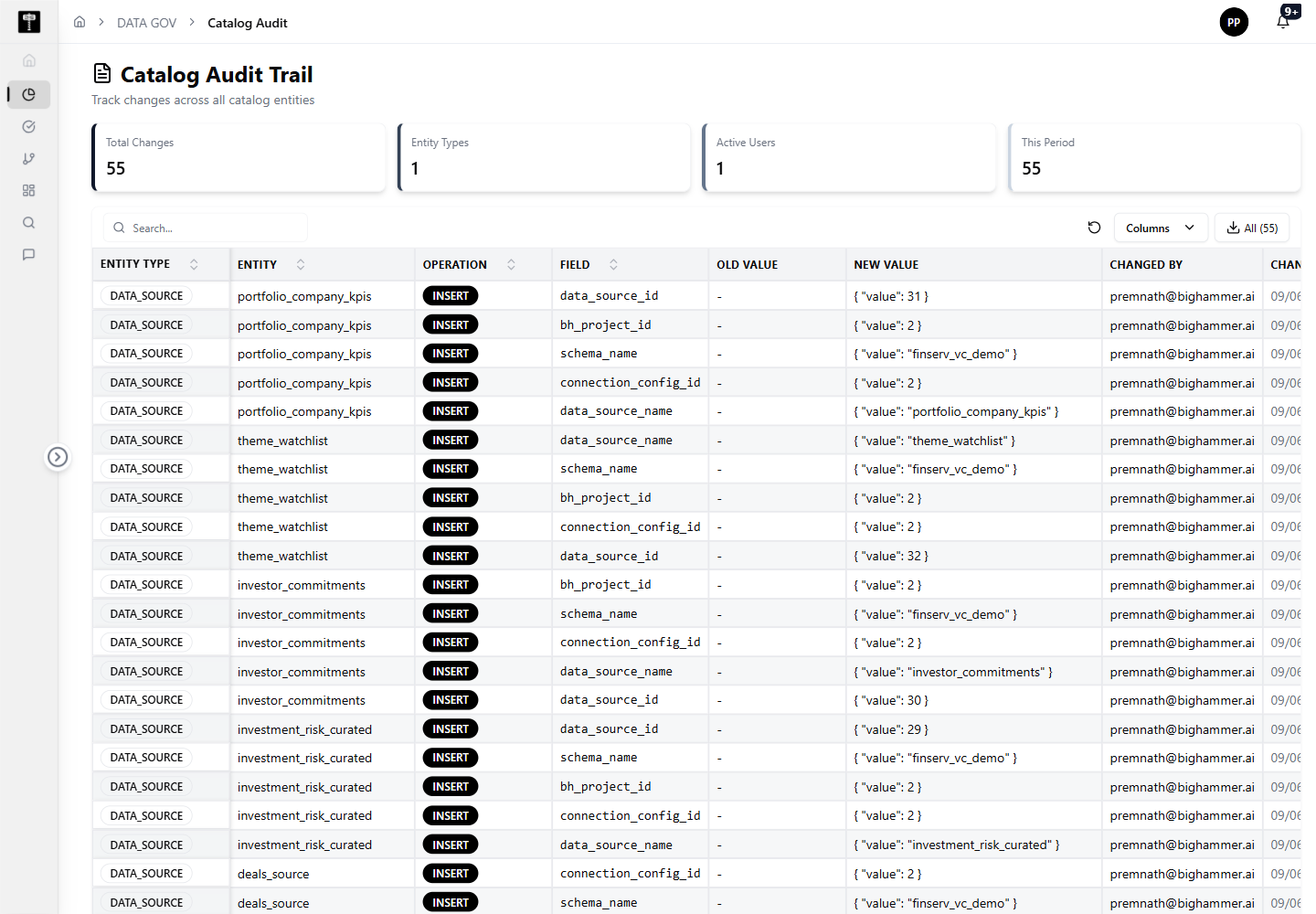
Review audit summary metrics
The page starts with audit summary cards. In the captured environment, the dashboard shows:
- Total Changes: 55
- Entity Types: 1
- Active Users: 1
- This Period: 55
These cards give a quick health check before reviewing individual audit rows.
Inspect audit records
The audit table includes columns for:
- Entity Type
- Entity
- Operation
- Field
- Old Value
- New Value
- Changed By
- Changed At
The visible records show DATA_SOURCE changes with INSERT operations by user@example.com.
Search, configure columns, and export
Use the search box to narrow the audit table. Use Columns to control visible table fields. Use Download CSV to export audit records for review.
Typical path
| Step | Action | Location |
|---|---|---|
| 1 | Open DATA GOV | Main sidebar |
| 2 | Select Catalog Audit | Data Gov navigation |
| 3 | Review summary cards | Audit header |
| 4 | Search or inspect audit rows | Audit table |
| 5 | Configure columns or download CSV | Table actions |
What happens next
Audit evidence can be used for governance review, troubleshooting, and compliance reporting.