Feed Identity
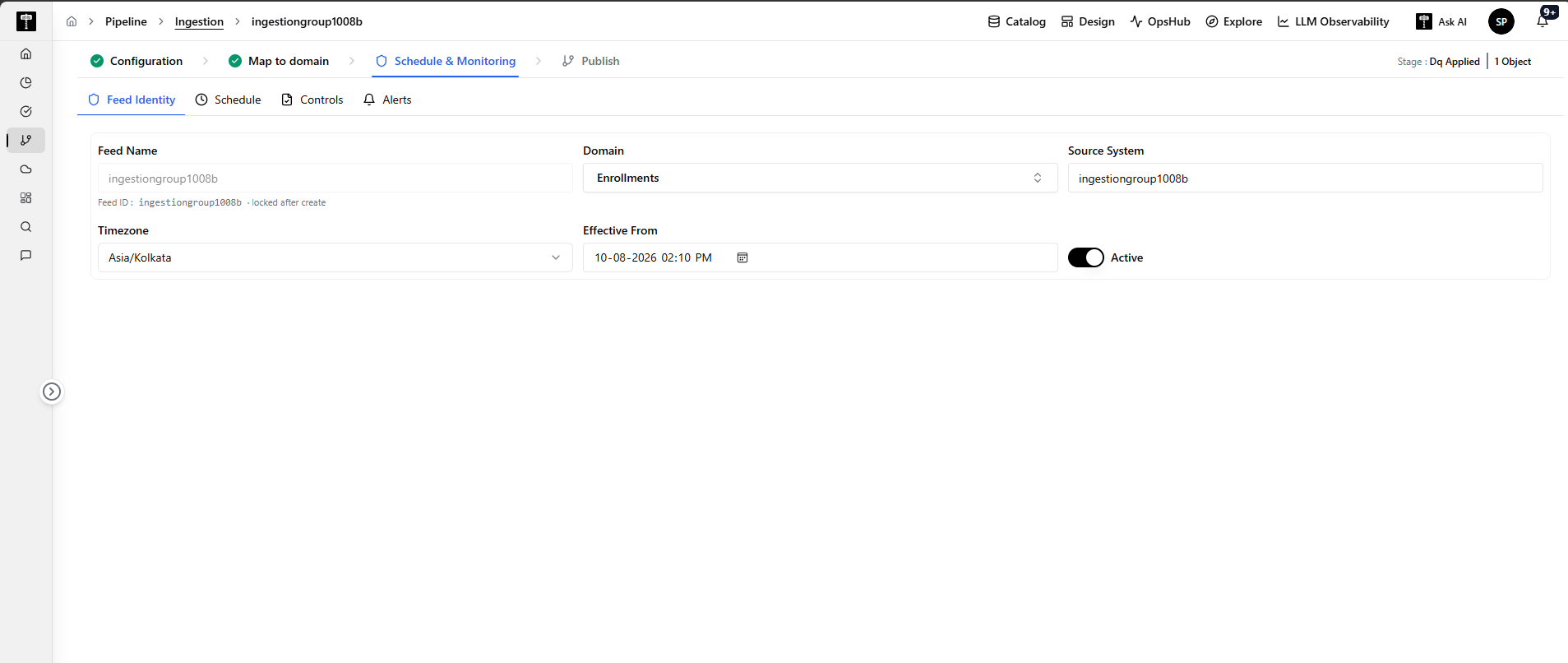
The Feed Identity section contains the foundational information used to uniquely identify, classify, and manage an ingestion feed across the platform.
Configuring Feed Identity establishes the feed's operational profile, associates it with a business domain and source system, and sets the baseline timezone and effective timeframe for all downstream monitoring and Service Level Agreements (SLAs).
Why Feed Identity is Needed
In enterprise environments with hundreds of data feeds, clear identity and classification are essential for:
- Operational Clarity: Ensuring operators and monitoring dashboards can instantly identify which business domain and source system are involved when an alert fires.
- Accurate SLA Timing: Binding the feed to its true operational timezone so scheduled cutoffs, arrival deadlines, and business dates calculate accurately.
- Audit & Lifecycle Control: Defining when monitoring rules take effect and providing a master toggle to activate or deactivate monitoring.
Field-by-Field Configuration Reference
The table below outlines every field, setting, and toggle available under Feed Identity:
| Field / Control | Description & Purpose | Example Value | Behavior & Operational Impact |
|---|---|---|---|
| Feed Name | Defines the human-readable display name and unique identifier for the feed. | ingestiongroup1008b | Used to identify the feed across OpsHub and configuration screens. Note: Once created, the Feed ID / Feed Name is permanently locked and cannot be edited from this step. |
| Domain | Specifies the functional business domain that owns or consumes the data. | EnrollmentsClaimsBilling | Organizes feeds in OpsHub, enabling domain-level filtering and helping triage which business stakeholders may be impacted by an issue. |
| Source System | Identifies the upstream application, database, or external vendor providing the raw data. | ingestiongroup1008bCore_Admin_System | Informs operators where incoming data originates during delay investigations, validation failures, or file transfer issues. |
| Timezone | Defines the IANA timezone used to evaluate all schedules, arrival cutoffs, and SLA deadlines. | Asia/KolkataAmerica/New_YorkUTC | Ensures scheduled runs and SLA evaluations align with the provider's local business day. Handles Daylight Saving Time (DST) transitions automatically. |
| Effective From | Defines the exact start date and time from which the feed's monitoring rules become active. | 2026-08-27 00:00:00 | Establishes the start of the policy lifecycle. The system will only evaluate SLAs and quality rules on or after this timestamp. |
| Active Toggle | Master operational switch controlling whether the feed is actively monitored. | Active (Toggle ON)Inactive (Toggle OFF) | • Active: The feed is actively scheduled, quality checks run, and alerts are dispatched. • Inactive: The feed is paused and will not trigger SLA evaluations or notifications. |
Operational Considerations & Best Practices
- Locking Policy: Because the Feed Name and Feed ID serve as the immutable primary key in the audit database and OpsHub matrices, ensure the name follows your organization's naming convention before publishing.
- Domain Alignment: Always select the business domain that accurately reflects the data content (e.g., choose
Enrollmentsfor member files,Claimsfor adjudication records) to ensure alerts route to the proper domain stewards. - Timezone Consistency: Set the timezone to match the source system's operational region. If a vendor in New York generates files at 6:00 AM EST, configuring
America/New_Yorkensures expected arrival times match vendor expectations without manual UTC offsets. - Deactivating for Maintenance: If a source system undergoes scheduled maintenance or a feed is deprecated, toggle Active to
OFFto prevent false breach alerts in OpsHub.